Advanced Dynamic Pricing For WooCommerce: Implementing different pricing models

Implementing different pricing models can significantly impact a business’s success by aligning its revenue strategies with market dynamics, customer behavior, and competitive landscapes. Various models cater to different business needs—whether it’s attracting price-sensitive customers or maximizing revenue from premium products.

Integrating various discount models in a WooCommerce store can yield significant profits for both the business and its customers, ensuring a mutually beneficial shopping experience through strategic pricing. Let’s review the most favourite dynamic pricing scenarios for the WooCommerce store and how to implement them using our Advanced Dynamic Pricing and Discount Rules for WooCommerce plugin.

Sitewide discount

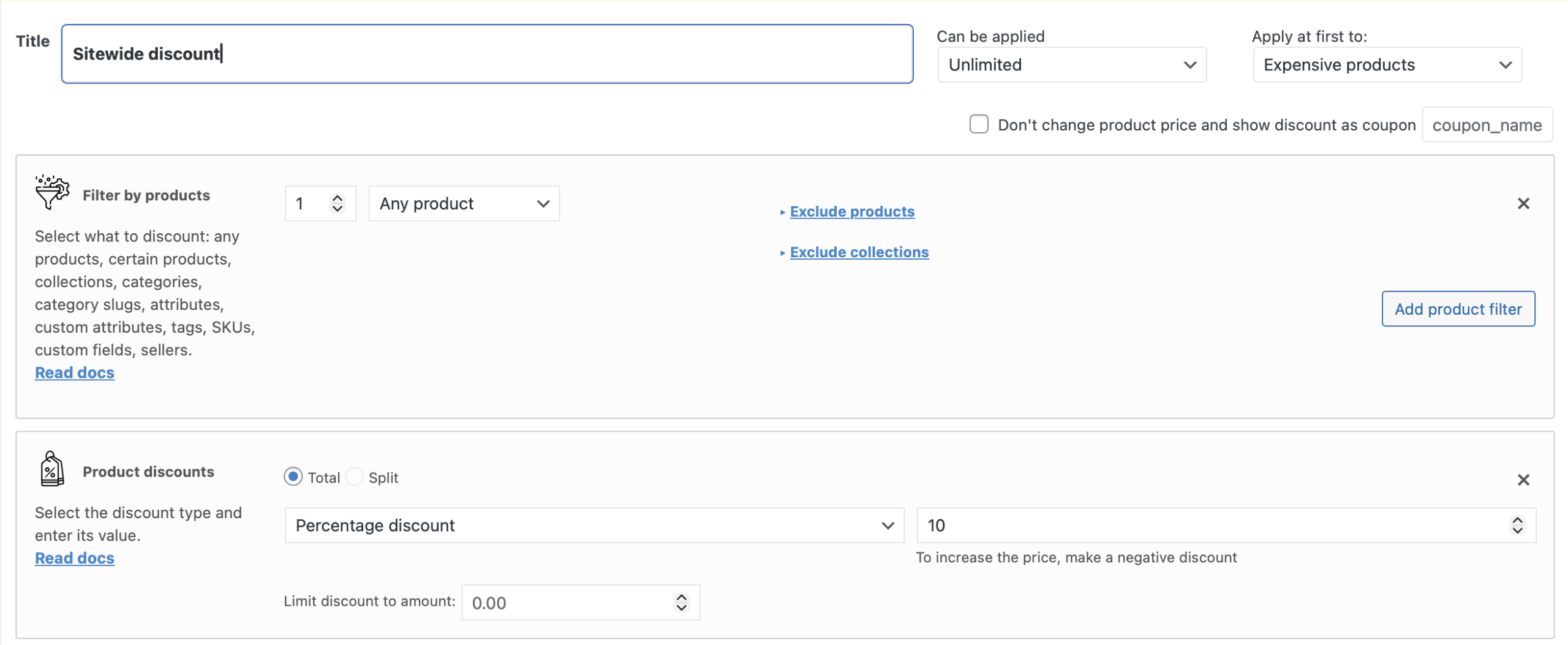
One of the best strategy for the business is a sitewide discount. For the business, offering a sitewide discount can rapidly increase sales volume, clear inventory, and enhance brand visibility. Customers benefit by enjoying discounted prices across the entire store, encouraging them to explore and purchase more products.

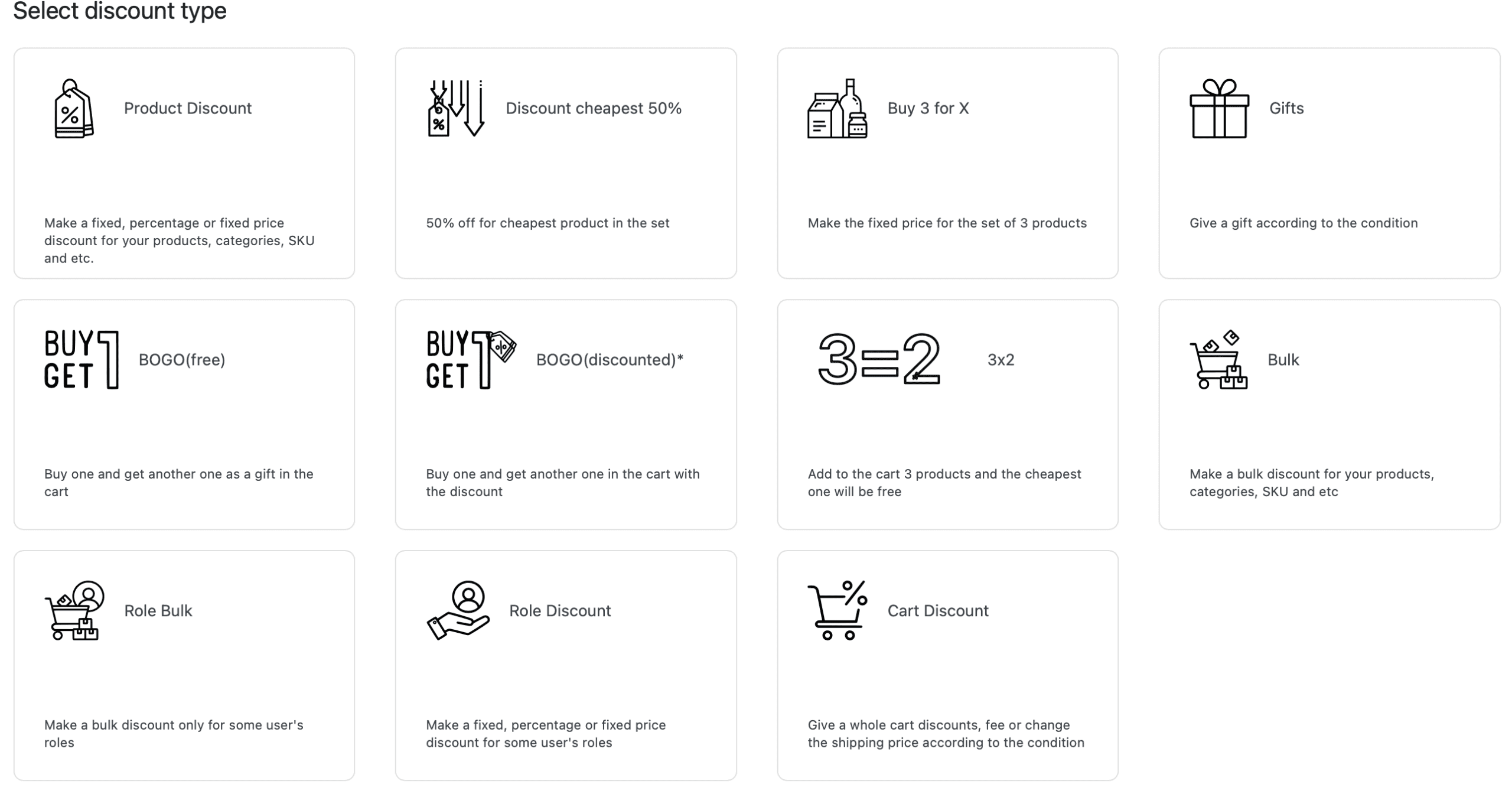
It’s very easy to implement that kind of discount using Advanced Dynamic Pricing and Discount Rules for WooCommerce: just click the button “Add rule” and choose the “Product Discount” rule’s template. Then change the Product Filter’s value to the “Any Product”, choose the discount’s type and amount and click “Save changes” button. That’s all you need to do to make a sitewide discount with Advanced Dynamic Pricing and Discount Rules for WooCommerce!

Cart Discount

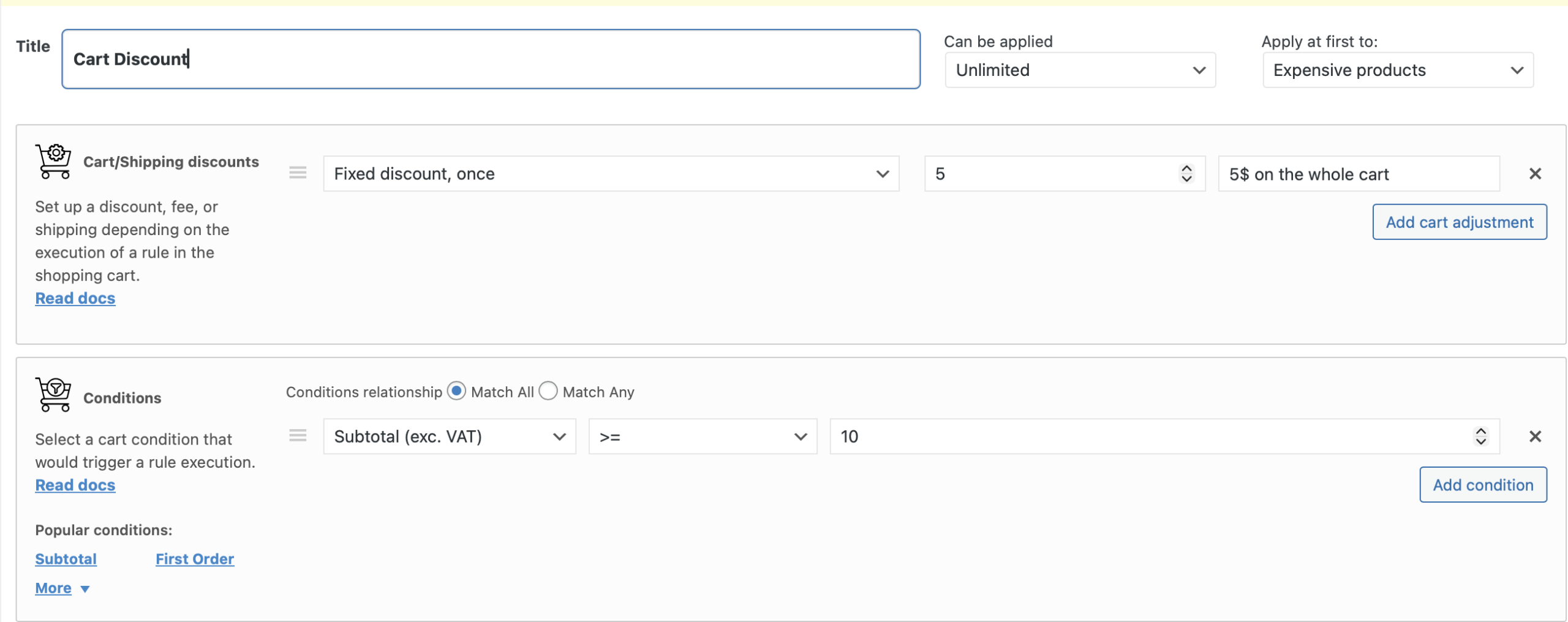
The Cart Discount discount strategy is also widely spread in the WooCommerce stores. With the cart discounts businesses can boost average order values and reduce cart abandonment rates. Customers appreciate the savings applied at checkout, making them more likely to complete their purchases in the WooCommerce store.

Advanced Dynamic Pricing and Discount Rules for WooCommerce can help you to create a cart discounts too: click the “Add rule” button and choose the “Cart Discount” template. There are a various cart discounts type that can be provided for your customers: from fixed discount coupon to the free shipping and tax exemption (only pro version).

Product Discount

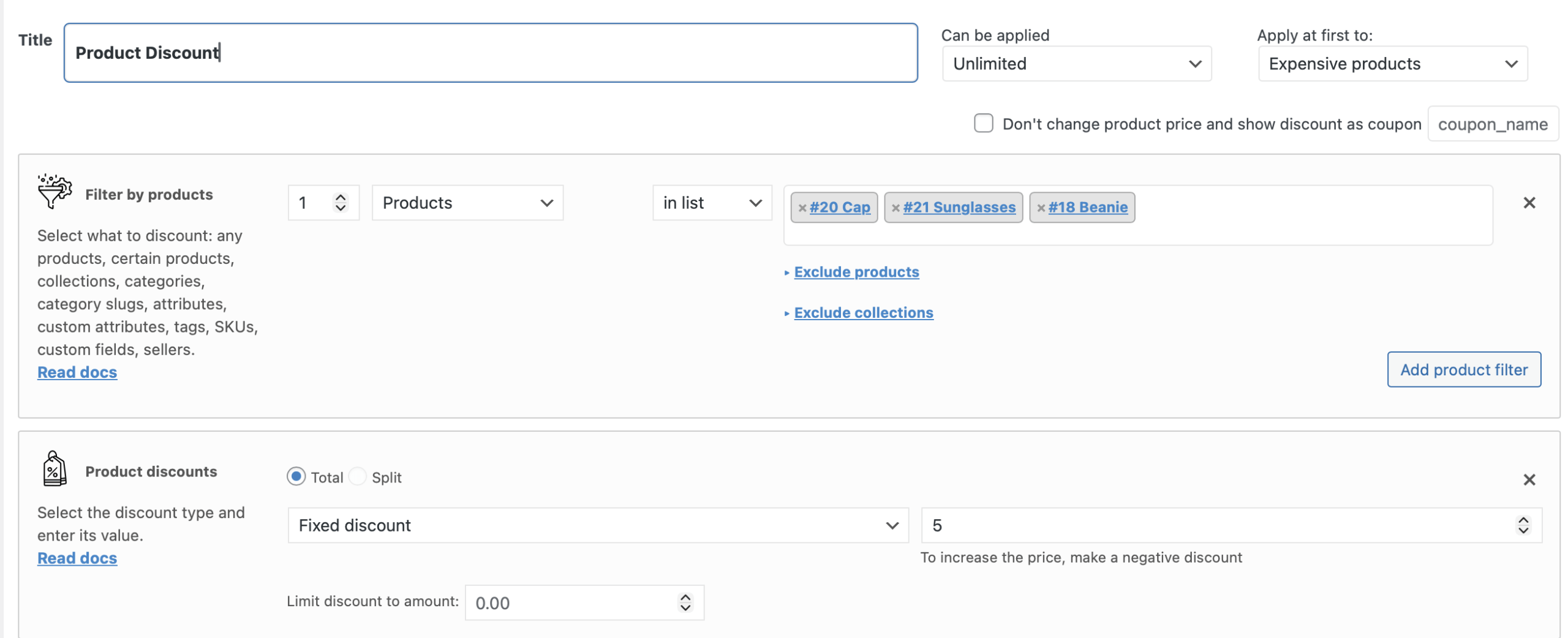
By applying discounts to specific products on the WooCommerce store, you can efficiently manage stock and amplify sales of targeted items. The exact products list to discount can be managed by the stock quantity or, for example, by the season. Customers gain access to lower pricing on the products they have been wanting to buy for a long time, increasing their satisfaction and likelihood of returning.

Simple Product Discount rule can be created by the Advanced Dynamic Pricing as the same way as in the first case, a Storewide Discount. But the only difference is in choosing the products that should be discounted in the Product Filter section. Also, there’s a tool that allows to import the CSV file with the products list and the discounts that should be applied on it, read about this tool more on our documentation site.

Category Discount

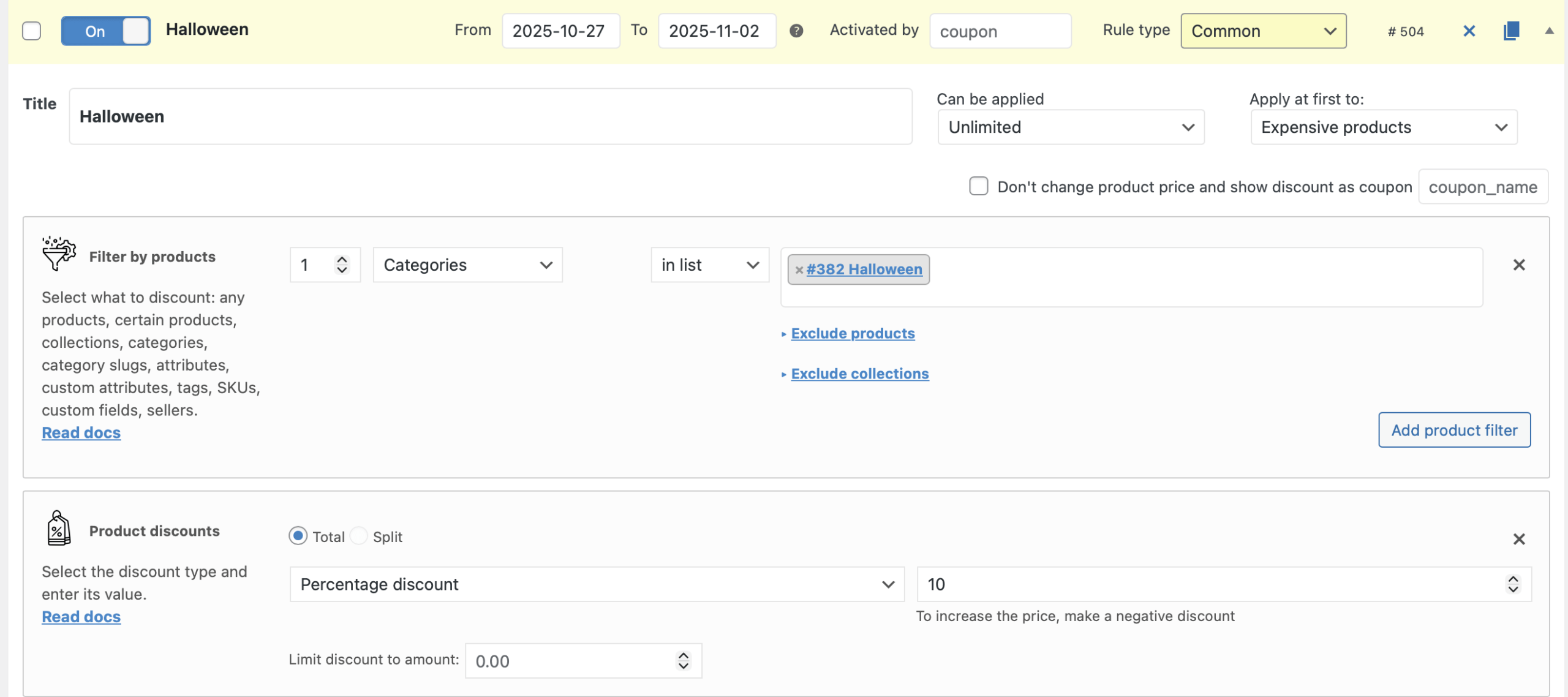
Category discounts enable businesses to spotlight certain product ranges, driving traffic and sales in those areas. There’s also a possibility in the WooCommerce to create a separate category for the season sales, for example, Halloween products, and make a discount only by this category on the Halloween. Customers benefit from reduced prices on items within specific categories, encouraging exploration and trials.

Let’s create a discount for the Halloween category of the products on the Halloween week with the Advanced Dynamic Pricing and Discount Rules for WooCommerce. It’s also need to choose the Product discount template and find the “Category” value in the “Product filter” drop-down. Let’s find the “Halloween” category. Also, let’s limits the rule’s applying only on the Halloween week and input the dates near the rule’s name.

Role Discount

Providing discounts based on user roles fosters loyalty among key customer segments, such as members or wholesale buyers, boosting long-term profits for the store. Customers in these roles enjoy special pricing, enhancing their loyalty to the WooCommerce store.

One of the frequently asked rule for the role discount model is a discount for the wholesalers. In Advanced Dynamic Pricing and Discount Rules for WooCommerce plugin it’s possible to create in a few clicks: just choose the template “Role discount”, find the “Wholesaler” role and input the discount value and type.

Bulk Discount

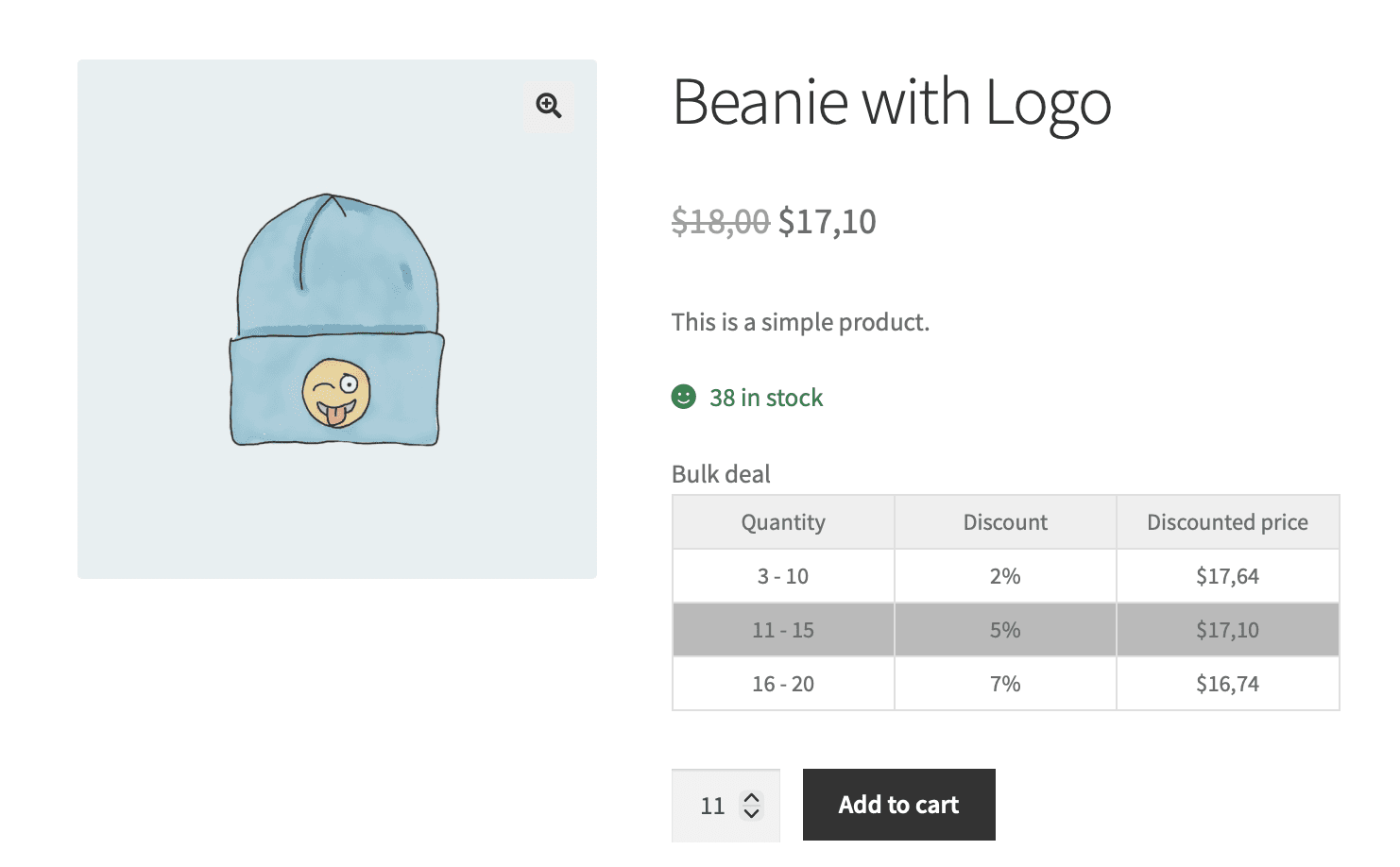
Encouraging bulk purchases increases overall sales and reduces inventory for the business. Customers benefit from reduced pricing on large quantities, making it attractive for them to buy in bulk and save more.

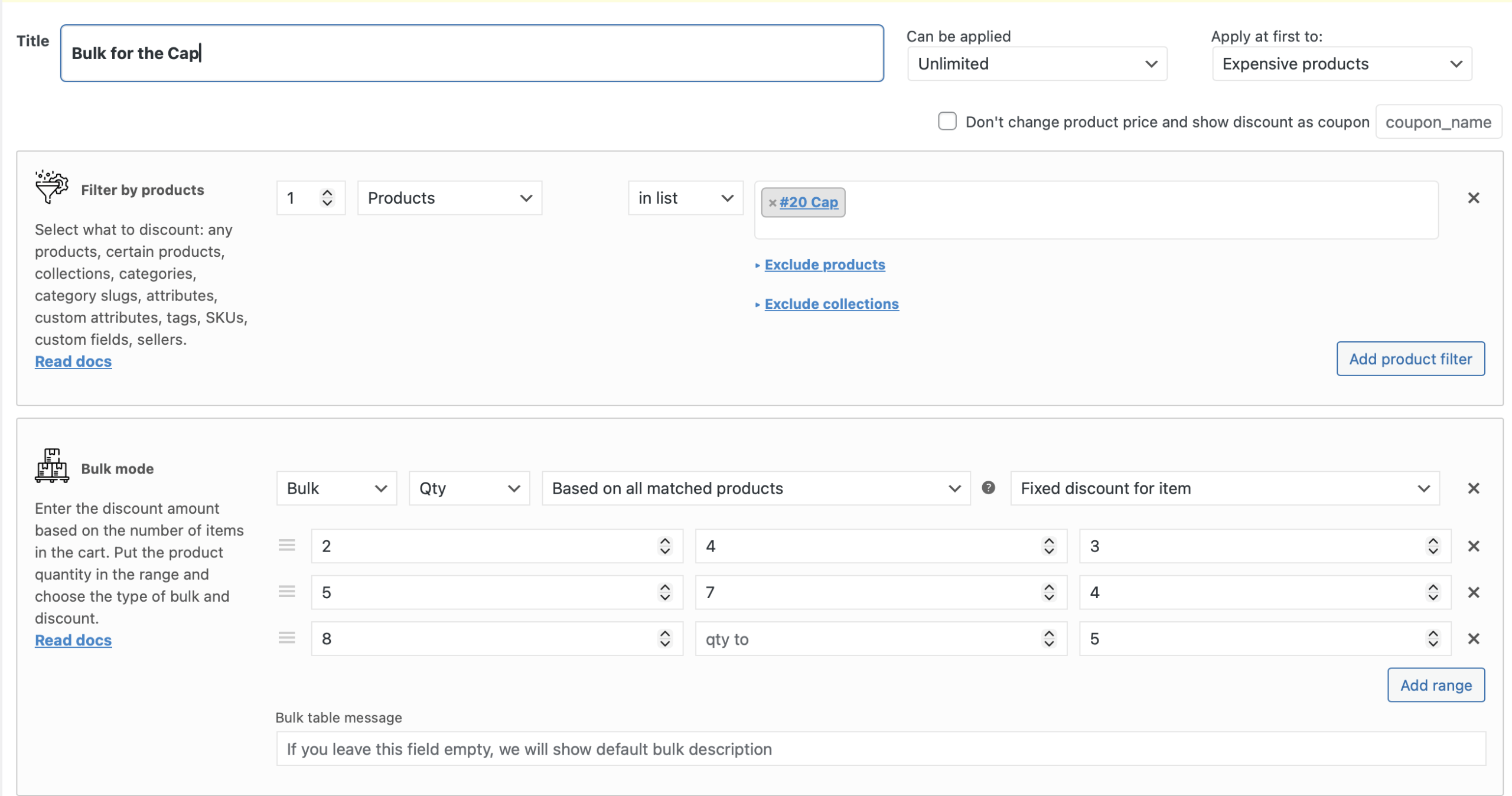
Let’s create a simple bulk discount for the filtered product with the Advanced Dynamic Pricing and Discount Rules for WooCommerce: click “Add rule” button and choose “Bulk” template. There are a lot of bulk modes and discount modes for the bulk rules, read more about them all on our doc site.

Bulk Discount for Category

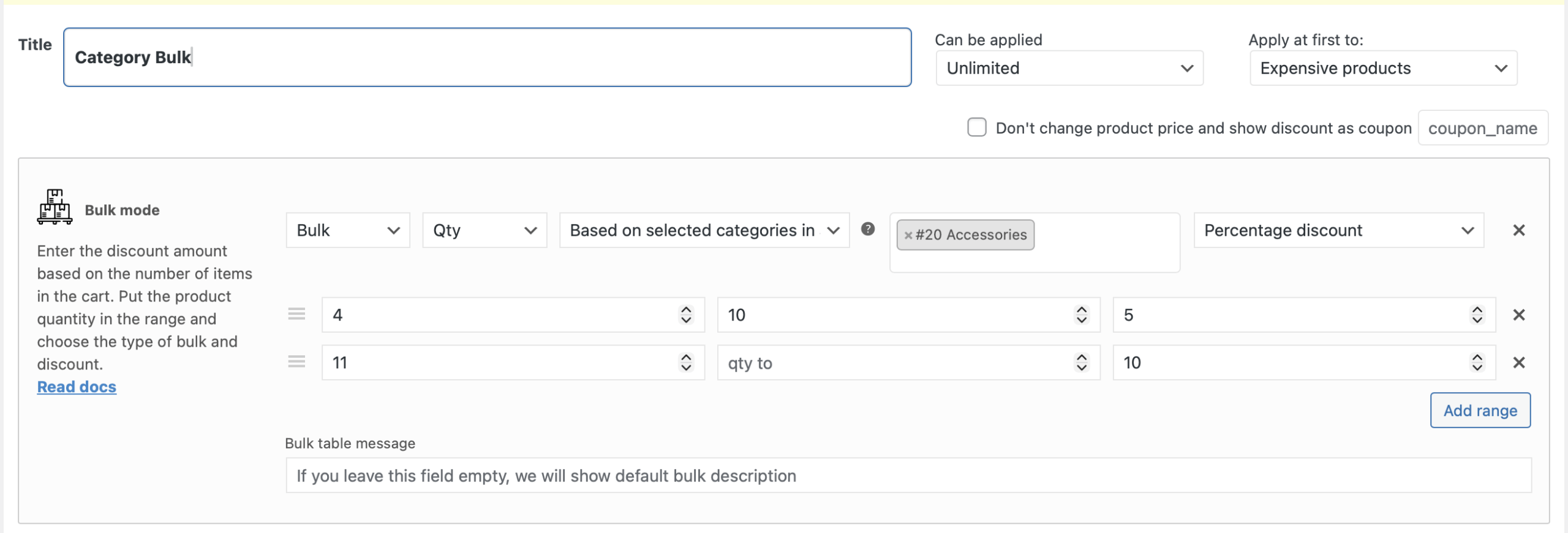
This strategy increases the movement of products within specified categories, generating profits for the business. Customers find value in purchasing bulk quantities at discounted prices within chosen categories. It’s easy to create the bulk rule for category: just change the Product Filter type in the example above, or change the bulk’s mode to the “Qty based on the selected category”:

Bulk Discount for Role

Employing bulk discounts for specific roles optimizes sales and loyalty among segmented customer groups. Role-specific customers enjoy additional savings on bulk purchases, underscoring their value to the store.

For creating a bulk role rule, just choose the “Role Bulk” template:

BOGO (Buy One Get One)

BOGO deals enhance customer engagement and inventory turnover, boosting store profitability for your WooCommerce store. Customers enjoy receiving additional products for free, enticing them to purchase and return for future offers.

Using the Advanced Dynamic Pricing for WooCommerce you can create a BOGO rule using the corresponding template: “BOGO (free)”. It’s easy to choose the product that will be added to the cart for free with the filtered product.

Gift Discounts

Offering discount strategies on gifts can increase store traffic during special occasions, maximizing seasonal revenue. Customers benefit by obtaining potential gifts at reduced prices, making shopping more appealing and economical.

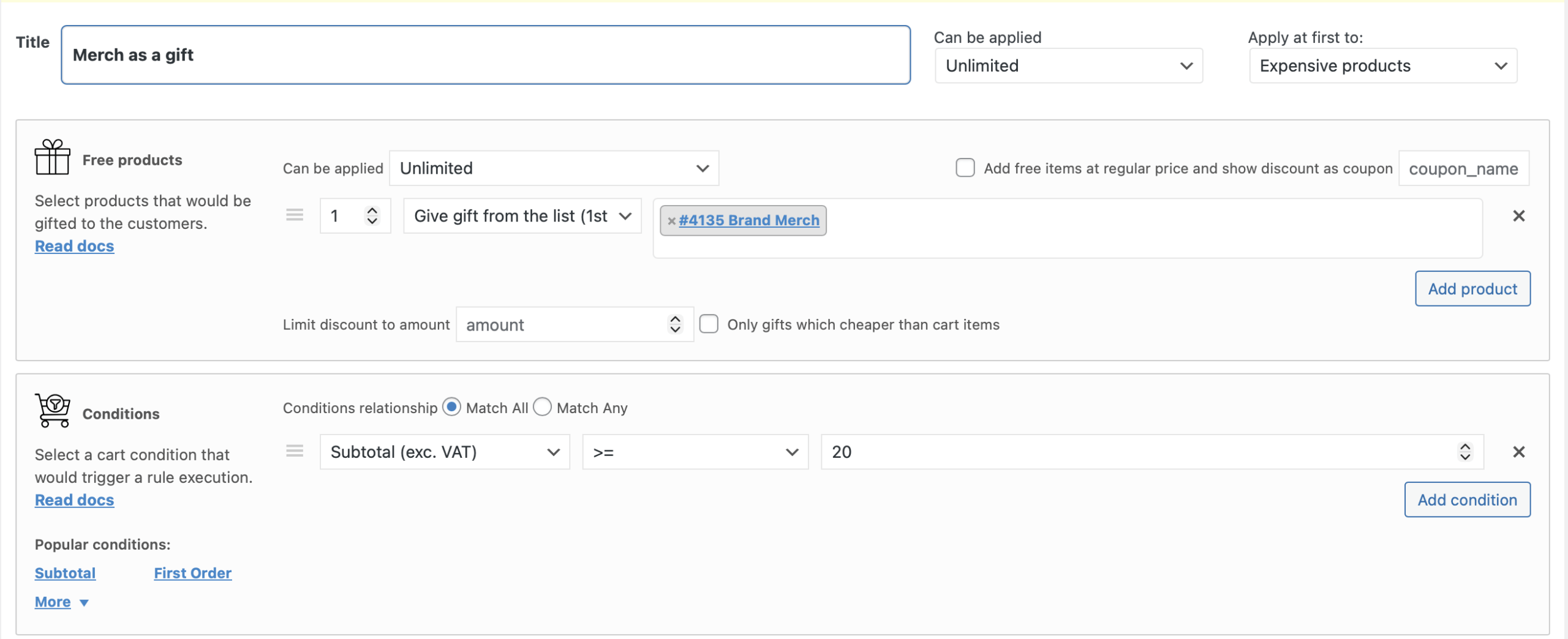
You can give as a gift a small merch of your brand for every customer who will buy on $20 and more. That’s how to implement it with the Advanced Dynamic Pricing and Discount Rules for WooCommerce:

Cart Fee (for payment gateway)

Some banks get an additional fees for the transactions. Although not a typical discount, strategically incorporating a cart fee for payment gateways helps businesses offset transaction processing costs, maintaining overall profitability. Customers are made aware of the transparent pricing structure, increasing their trust in the WooCommerce store.

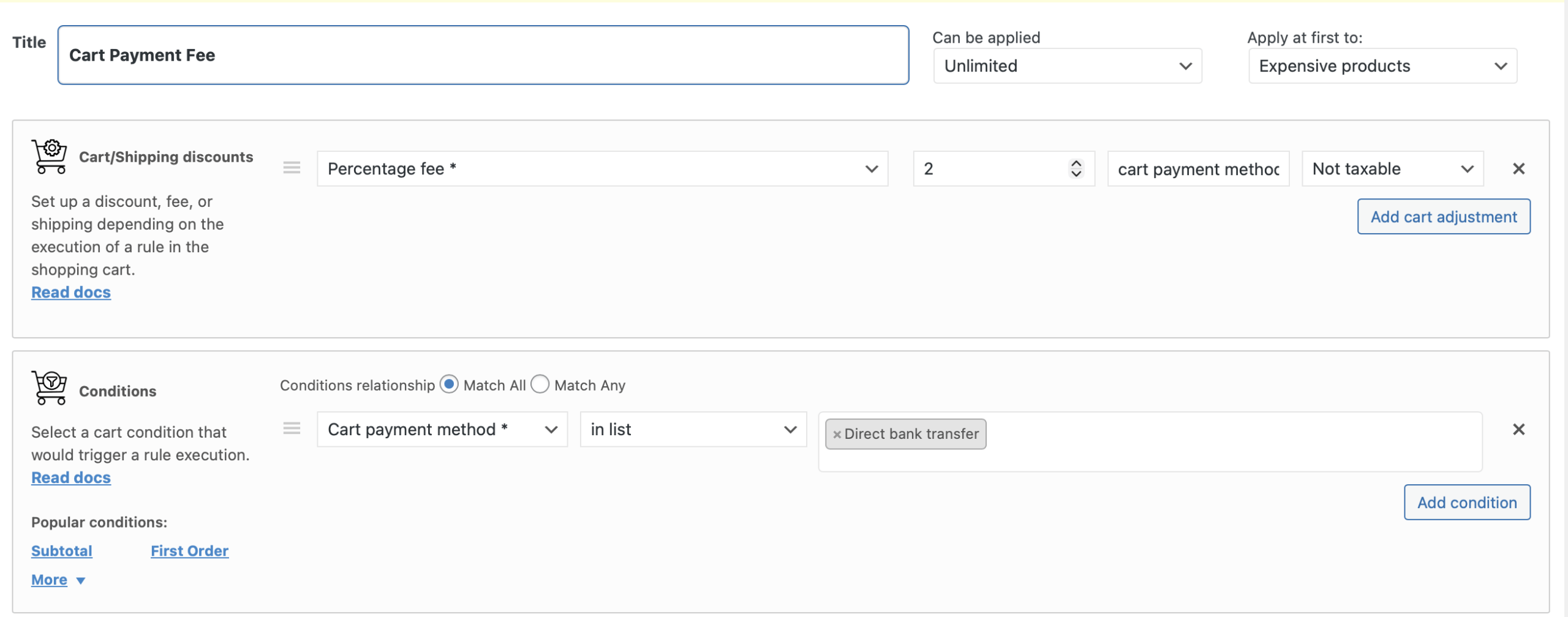
To create a cart fee for the selected payment method rule, you need PRO version of the Advanced Dynamic Pricing and Discount Rules for WooCommerce plugin. Then, click “Add rule” button and choose “Cart Discount” template. Then find a “Percentage fee” in the “Cart/Shipping discount” section and the Cart condition “Cart payment method”. Input the necessary values and get the additional fee for the payment gateway.

You can choose any discount and pricing strategies to harmonize business and customer interests, ensuring profitability and customer satisfaction, our Advanced Dynamic Pricing and Discount Rules for WooCommerce plugin helps you to implement it on your WooCommerce store.

How to Export WooCommerce Subscription Orders Correctly

Subscription-based models have become a cornerstone of modern eCommerce. Whether you run a subscription box service, a membership site, or offer recurring product deliveries, managing subscription data is a critical part of your WooCommerce operations. Unlike regular orders, subscription orders require more detailed tracking due to their recurring nature, renewal cycles, and billing complexity. Exporting this type of data correctly allows store owners to maintain financial accuracy, fulfill customer expectations, and integrate with third-party systems such as CRMs, ERPs, or accounting software.

Out of the box, WooCommerce Subscriptions provides a solid foundation for managing recurring payments, but it does not include robust export functionality. For businesses that need structured, filtered, and automated reports, the native options fall short. This is where Advanced Order Export for WooCommerce by AlgolPlus becomes essential. The plugin extends WooCommerce’s capabilities by enabling detailed, customizable, and automated exports specifically tailored to handle subscription data.

Subscription Exports: What Makes Them Unique

Exporting WooCommerce subscription orders differs from standard orders in several ways. Each subscription can include multiple related records over time, such as initial sign-ups, renewals, payment retries, or failed transactions. These must be captured and understood in the context of the entire subscription lifecycle. Without accurate exports, it’s easy to miss important billing events or underreport recurring revenue.

With the Advanced Order Export plugin, store owners can apply filters to isolate subscription-related activity. This includes filtering by order status such as active, on-hold, or cancelled, and by dates relevant to subscription renewals rather than just original purchase dates. Additionally, the plugin allows exports based on specific payment gateways or customer metadata, ensuring that recurring orders are correctly categorized and delivered to the right systems.

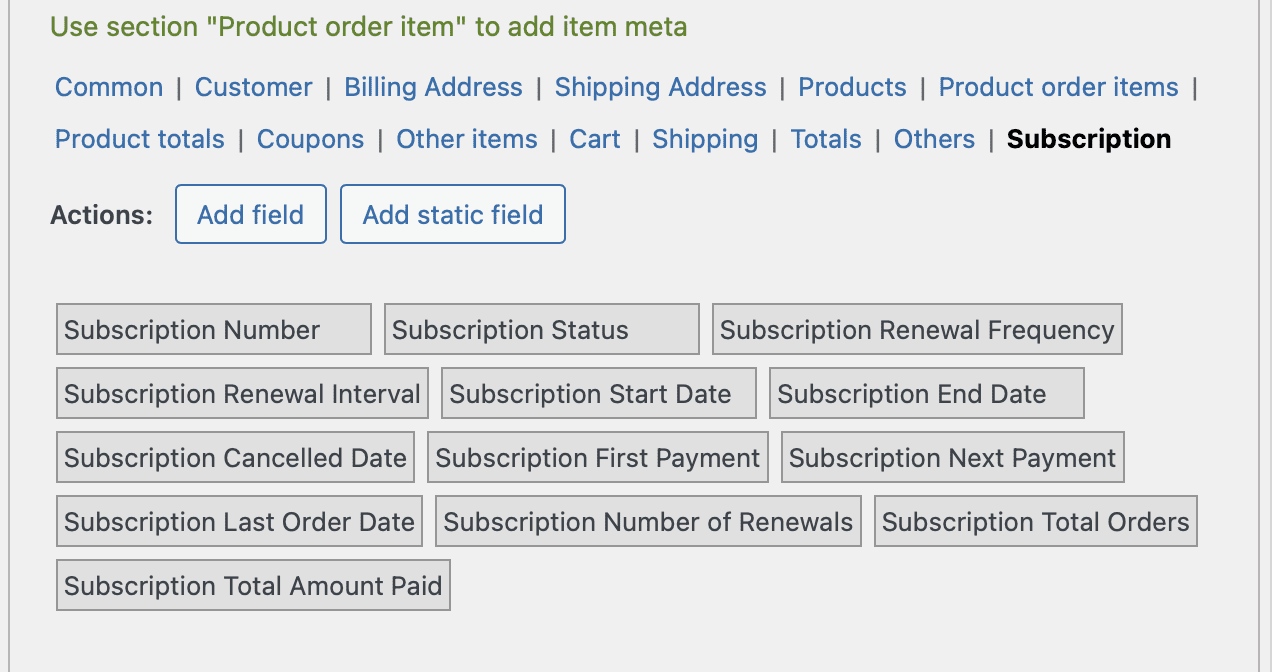
Export fields for the subscriptions

This level of detail is particularly useful when sending data to accounting teams or platforms that rely on recurring revenue recognition. By distinguishing initial charges from recurring ones and associating each order with its parent subscription, business owners gain clear visibility into performance and retention trends.

Automating Subscription Reports for Efficiency

A major advantage of the Advanced Order Export plugin is its ability to automate report generation. Subscription orders can be exported automatically on a set schedule or triggered by changes in order status. This ensures that subscription data is always current and delivered to stakeholders without manual effort. For instance, weekly reports of all renewed subscriptions can be sent directly to your finance department or fulfillment center.

The plugin supports multiple export formats including CSV, XLS, XML, and JSON, which means your subscription data can integrate seamlessly with third-party tools. Whether you’re syncing to Google Sheets, uploading to a cloud drive, or pushing data via Zapier, the process is streamlined and customizable. You can even include custom fields associated with subscriptions, giving you full visibility into plan types, billing intervals, or customer preferences.

Supporting Long-Term Subscription Growth

As subscription businesses scale, the volume and complexity of their data increase. Manual data handling becomes error-prone and inefficient. AlgolPlus designed this plugin with scalability in mind, allowing WooCommerce store owners to manage thousands of subscription records without performance issues. Each export profile can be saved, duplicated, and adjusted over time, making it easy to adapt as your reporting needs evolve.

Clients using the plugin report significant reductions in reporting errors and a clearer understanding of subscription metrics. One notable example includes a wellness subscription service that exports monthly reports filtered by payment method to identify churn patterns tied to specific gateways. With this insight, they improved their retry logic and reduced failed renewals by 17 percent.

The plugin also respects privacy and compliance standards by allowing the exclusion of sensitive data where necessary. This is especially important for businesses operating in regions with strict data handling regulations.

Accurately exporting WooCommerce subscription orders is essential for financial reporting, customer service, and long-term business strategy. With Advanced Order Export for WooCommerce, subscription businesses gain a professional-grade tool that delivers accurate, automated, and flexible exports designed to meet the specific needs of recurring revenue models. Whether you are scaling a subscription business or optimizing a high-volume WooCommerce site, this solution ensures your data is always in the right format, at the right time.

WooCommerce Tiered Pricing: What It Is and How to Set It Up

Tiered pricing is a well-established sales model that rewards customers for purchasing more by gradually lowering the unit price based on quantity. This approach not only increases the average order value but also helps stores manage inventory more effectively. Unlike traditional coupons or simple sales, tiered pricing is designed to incentivize behavior by offering real-time, data-driven savings during the purchasing process.

In WooCommerce, implementing such pricing strategies manually can be frustrating and time-consuming. Store owners often try to work around limitations using product variations or bulk editing tools, which quickly becomes unsustainable at scale. Without the right tools, there’s a risk of confusing customers with inconsistent pricing or of underpricing products due to manual errors.

Tiered pricing is particularly valuable for wholesale operations, B2B eCommerce, seasonal campaigns, and subscription-based models. These business models thrive when customers are offered logical and visible incentives to increase their order size. It creates a win-win scenario where the buyer gains a better deal, and the store increases revenue and clears more inventory.

Implementing Tiered Pricing in WooCommerce

WooCommerce by default doesn’t support complex pricing logic like quantity-based discounts or dynamic tiered rates. This is where a professional plugin such as Advanced Dynamic Pricing and Discount Rules for WooCommerce by AlgolPlus becomes a vital tool. It allows you to define pricing rules that automatically adjust based on the number of items a customer adds to their cart.

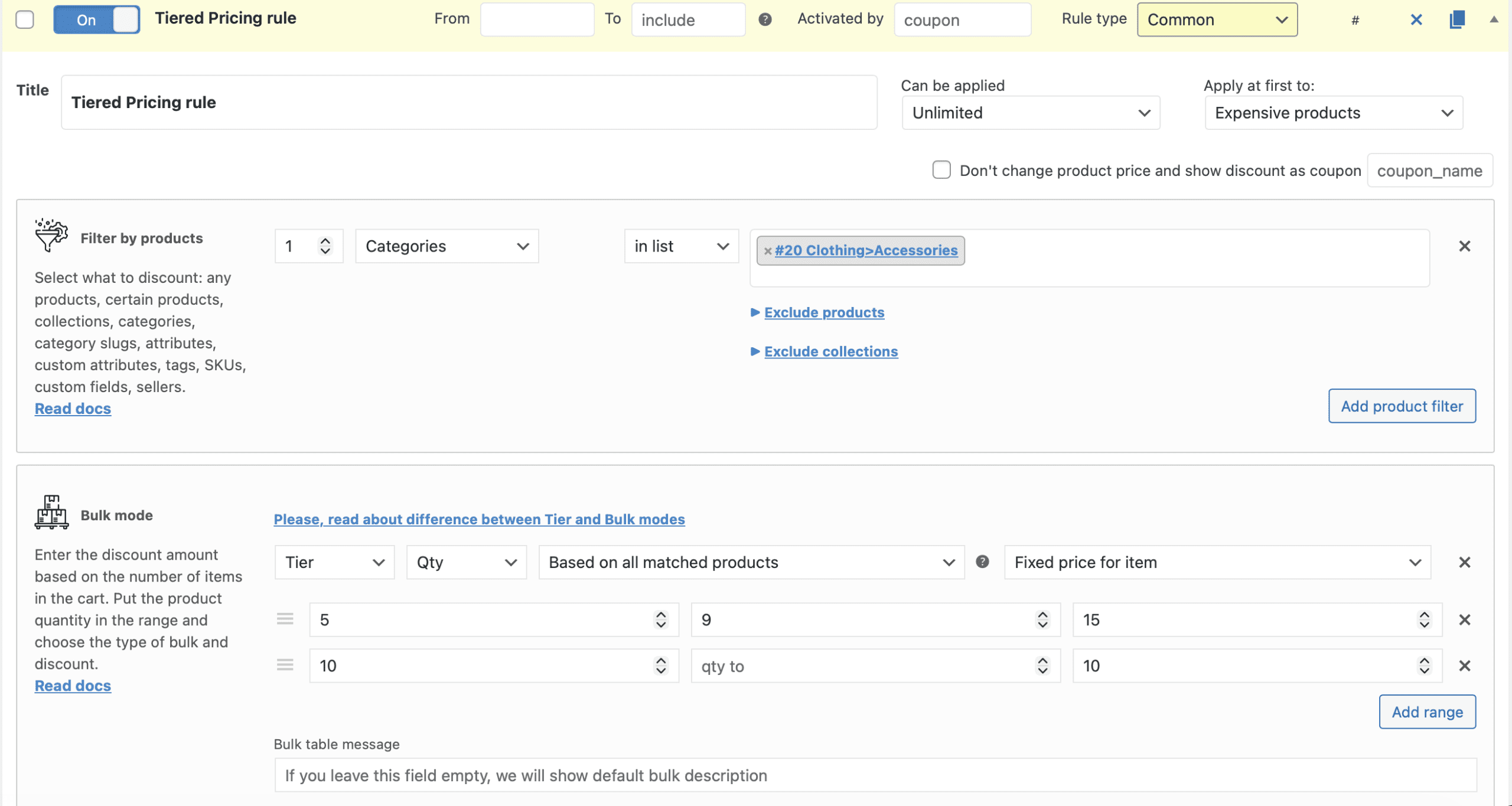
Instead of using static pricing or duplicating product variations, store owners can configure simple yet powerful rules directly within the plugin’s interface. For instance, you can create rules that apply a lower price per unit when a customer buys five or more, and another rule that offers a deeper discount when they buy ten or more. This pricing logic can apply across individual products, grouped products, or even entire categories.

Tiered Pricing rule's example
Tiered Pricing rule’s example

The plugin updates pricing in real time. When a customer increases quantity on the product page or in the cart, the unit price changes instantly to reflect the correct tier. This immediate feedback not only improves the user experience but also increases trust and transparency. Customers know exactly what they are paying and why, which reduces cart abandonment and support inquiries related to pricing confusion.

AlgolPlus has built its solution with performance and flexibility in mind. It doesn’t rely on WooCommerce’s core discount structures, which means you can apply multiple pricing layers simultaneously without conflict. For example, a customer could receive a volume discount, a loyalty discount based on their role, and a time-limited promotional offer—all configured within one ruleset and applied seamlessly during checkout.

Advanced Use Cases and Strategic Benefits

Stores that run frequent promotions, clearance events, or wholesale channels benefit the most from tiered pricing. When combined with other dynamic pricing conditions such as user role, geolocation, or cart content, the strategy becomes even more effective. You can offer region-specific pricing, encourage upsells through bundled discounts, or apply special rules for logged-in users who frequently buy in bulk.

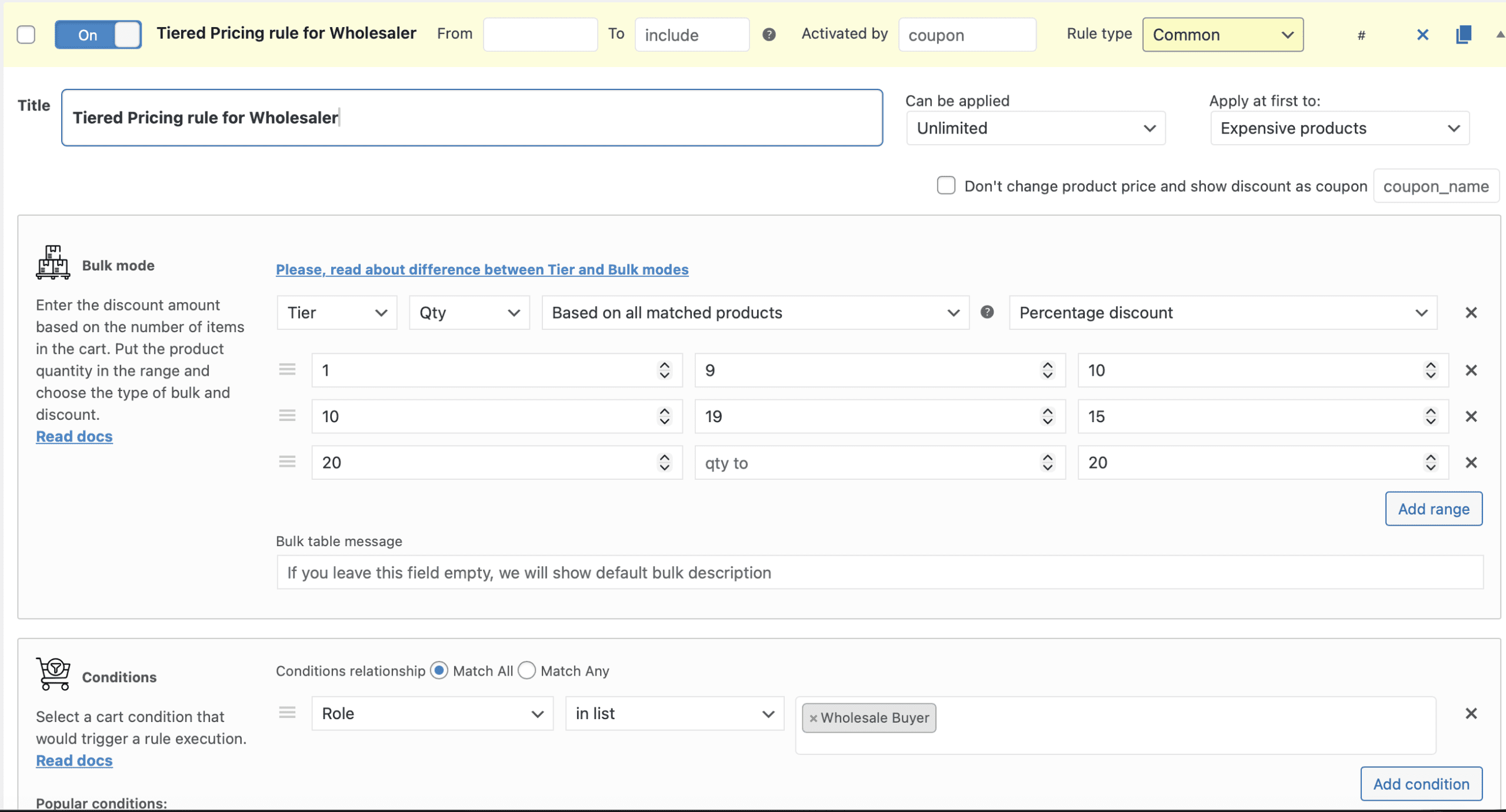
Tiered Pricing rule for Wholesaler
Example of the Tiered Pricing rule for Wholesalers

In real-world usage, businesses using this plugin have reported higher average order values within weeks of implementation. One case involved a retailer of eco-friendly household items that introduced tiered pricing across their product line. By encouraging customers to purchase more units of refillable products, they increased per-order revenue by 28% in the first month, while improving customer retention.

AlgolPlus ensures compatibility with other core WooCommerce features like tax classes, shipping zones, and custom product types. This is critical for stores that operate across different regions or require VAT-specific pricing rules. The plugin is regularly updated, backed by detailed documentation, and supported by a team that understands the complexities of WooCommerce scaling.

Moving Toward Smarter, Scalable Pricing Models

Tiered pricing is not just about offering a discount—it’s a strategic approach to influence purchase decisions, balance stock levels, and encourage long-term loyalty. With the Advanced Dynamic Pricing plugin from AlgolPlus, WooCommerce store owners finally have the tools to implement this pricing model with precision and flexibility.

Whether you’re just beginning to optimize your store or managing thousands of SKUs across international markets, tiered pricing offers a path toward smarter pricing and stronger sales performance. By setting clear thresholds and automating logic behind the scenes, you can focus on marketing and growth while your pricing engine does the heavy lifting.